▶ 프로젝트 세팅, 클래스 생성
제일 처음단계부터 ㄱㄱ
새 프로젝트를 만듬.
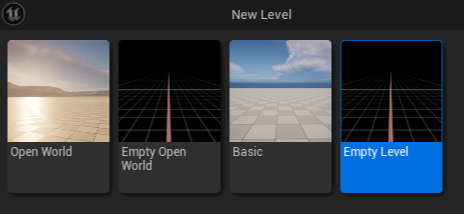
비어있는 레벨( Empty Level )을 생성함.
왜냐? Open World나 Basic은 렌더링(하늘, 타일 등등)이 들어가있고
Open이라는 단어가 붙은 것들은 월드 파티셔닝 기능이 들어가 있는데
그런거 다 필요없고 채팅 UI만 있으면되므로 굳이 렌더링 부하를 줄 필요가 없음.
아무것도 없는 Empty Level 로 만들어줌.
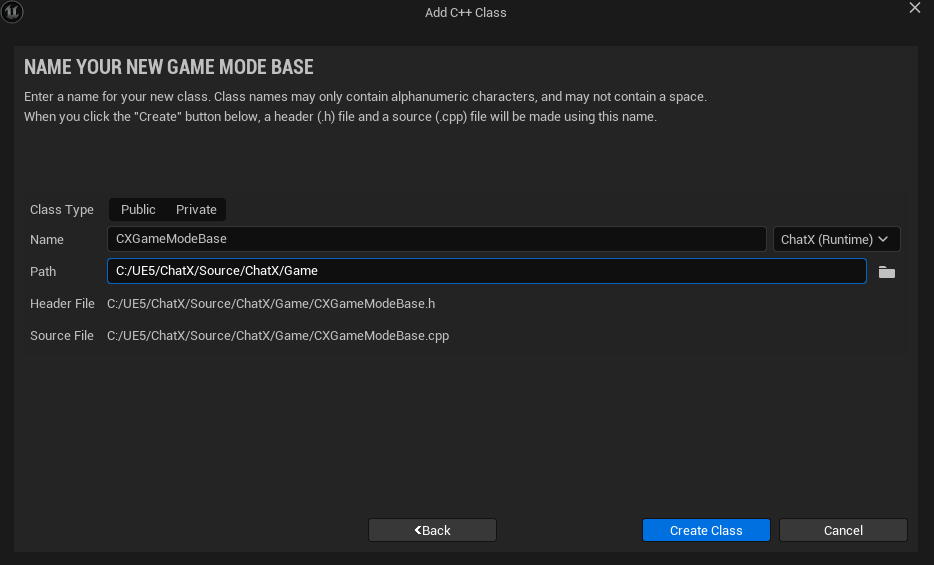
게임모드베이스 클래스를 만들어줌.
Path 끝에 /Game을 넣고 생성.
방금만든 클래스 파일의 상대경로를 찾지못해 빌드실패가 뜰텐데,
이때 어떻게하냐면
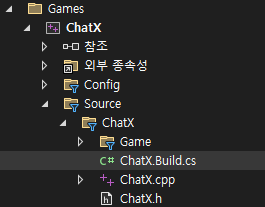
Build.cs에 들어가서
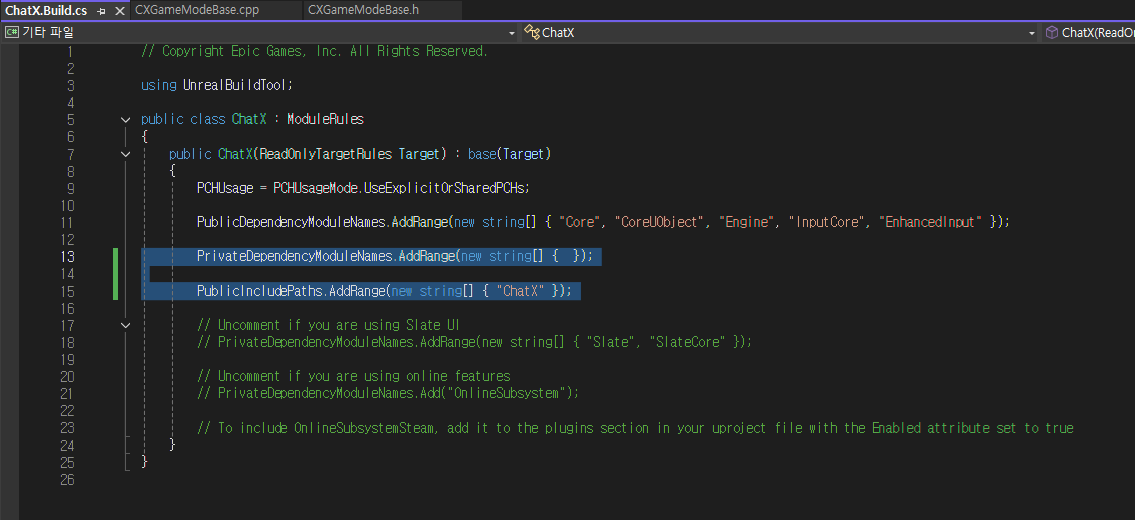
PrivateDependencyModuleNames.AddRange(new string[] { });
PublicIncludePaths.AddRange(new string[] { "ChatX" });
추가해줌.
다른 방법으로는

#inlude "Game/CXGameModeBase.h" 에서 Game/을 지워주는 방법이 있다.
(파일을 생성할때마다 이런식으로 해줌)

아까방식으로 플레이어 컨트롤러도 만들어준다.
Path 끝에 /Player를 붙히고 생성.
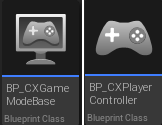
그리고 이 c++클래스들을 상속받는 블루프린트클래스들을 만들어준다.
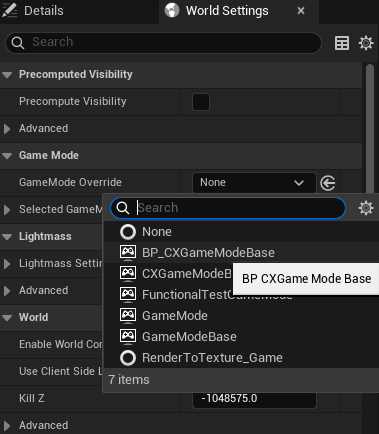
월드 세팅 - 게임모드와 플레이어 컨드롤러를 상속받은 걸로 설정.
▶ 채팅 입력창 위젯 구현하고 연결
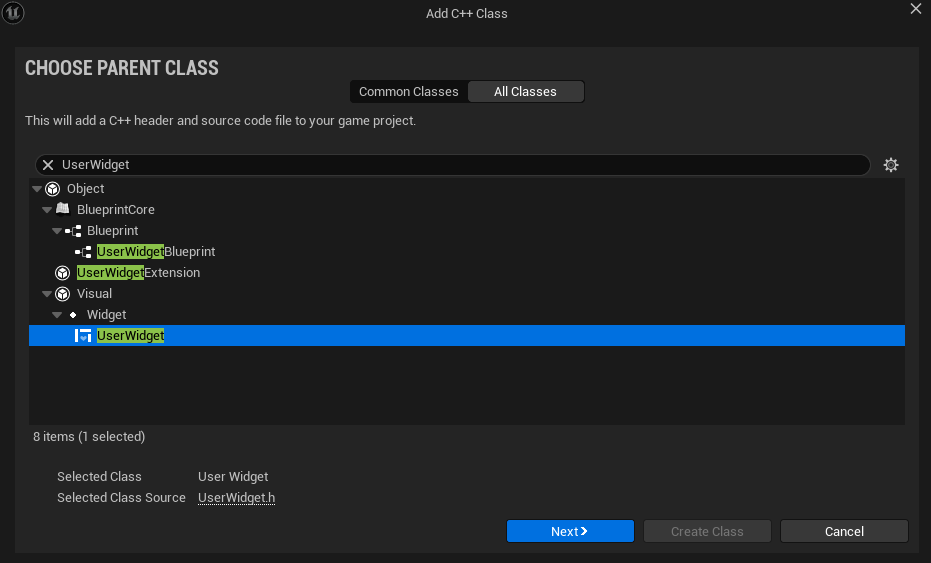

이렇게 C++ 클래스를 생성한다.
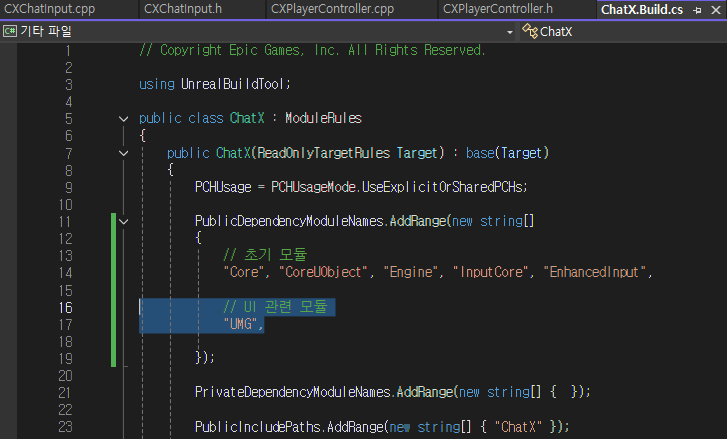
처음 클래스 만들고 했던 것 처럼
Build.cs에 들어가서 이렇게 해준다.
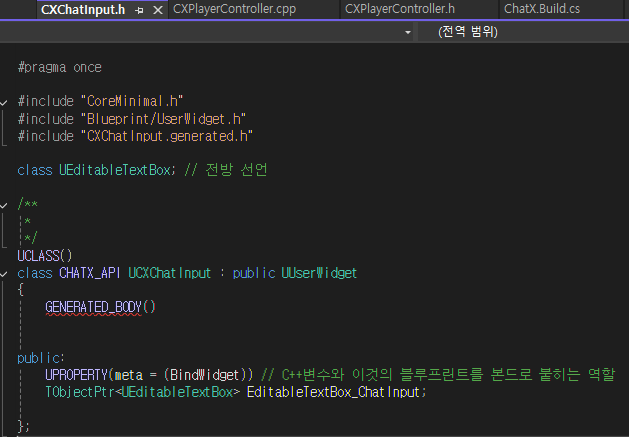
위젯클래스 헤더파일로 가서 이렇게 추가.
(다른 방법으로도 코딩 가능하지만 이런식의 키워드를 사용하는 방식이 편함)
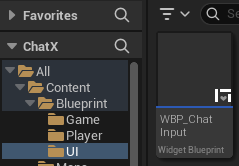
이 클래스를 상속받는 블루클래스 생성


열고, 컴파일 시도하면 이런식으로 안되는 모습.
이 위젯은 "EditableTextBox_ChatInput" 이 바인딩 되도록 요구하고있다는 뜻.
"EditableTextBox_ChatInput" 라는 위젯이 Hierarchy에 꼭 있어야 한다.
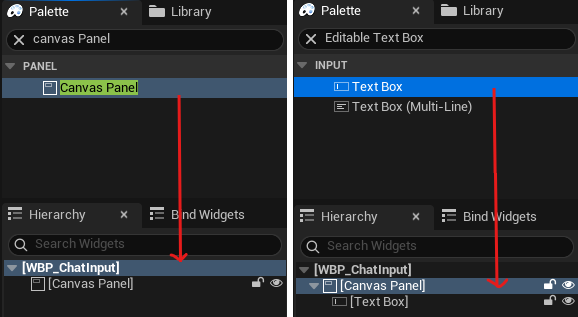
Palette 창에서 Canvas Panel - Editable Text Box 순 으로
Hierarchy에 드래그 & 드롭 !

[Text Box]를 클릭하고 디테일창에서
이름을 "EditableTextBox_ChatInput" 으로 정하고,
Is Variable을 체크해주고 컴파일 해보면 문제없이 될 것이다.
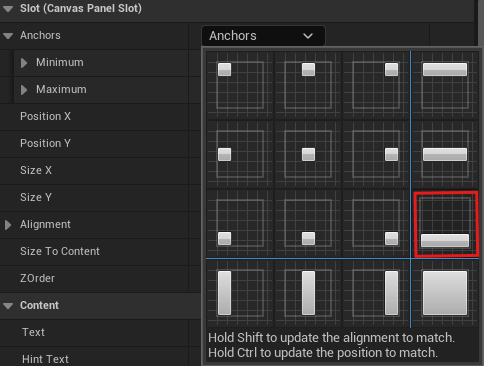
디테일창에 앵커(Anchors)를 눌러 뭘 쓸지 정한다.
앵커는 UI (버튼, 텍스트 등)가 화면 어느 부분을 기준으로
배치될지 결정하는 기준점이다.
채팅창답게 위치, 크기, 폰트, 세부설정을 건드려줌.

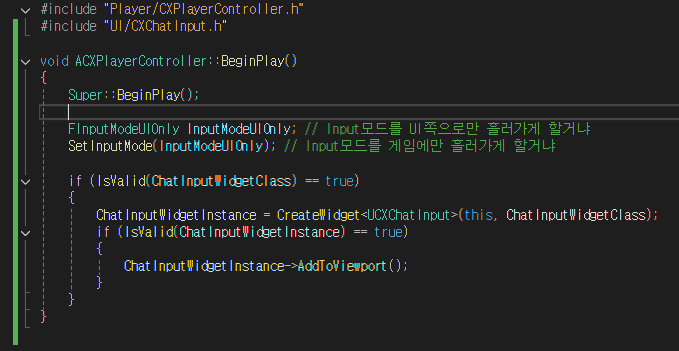
채팅위젯을 연결하기 위해 컨트롤러 부분을 손봐줌.
컴파일하고, 컨트롤러 블루프린트로 들어가서
Details → CXPlayer Controller → Chat Input Widget Class를
내가만든 채팅 위젯인 WBP_ChatInput으로 설정.

게임을 실행해서 테스트.
채팅이 잘나오는것까진 확인.
▶ 채팅 메시지 관리 및 출력 구현
채팅하고 엔터를 쳐서 출력시키는 것 구현해봄.
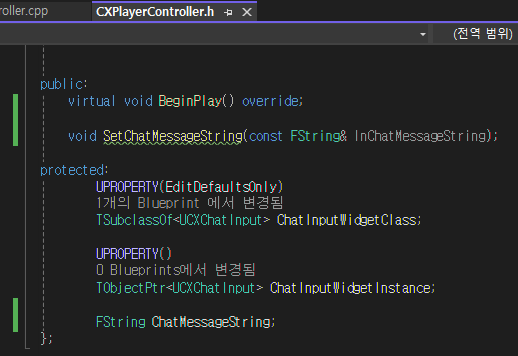
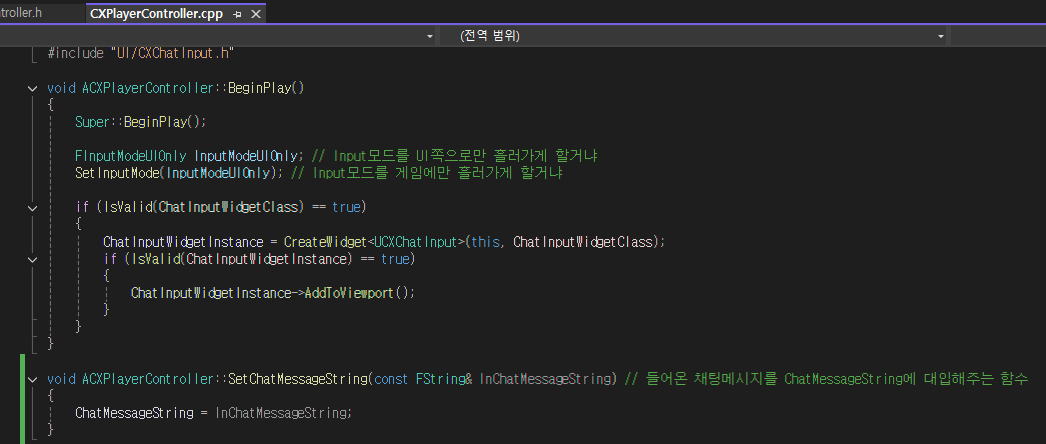
플레이어 컨트롤러 들어가서 몇가지 구문을 추가해줌.
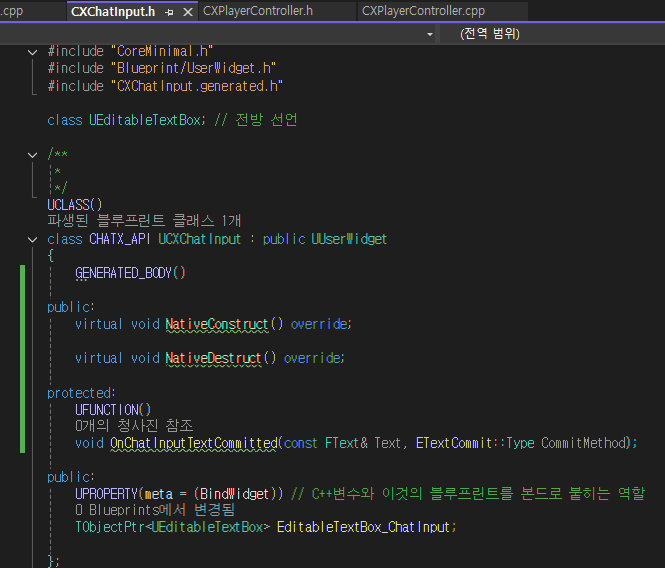
여기도 추가
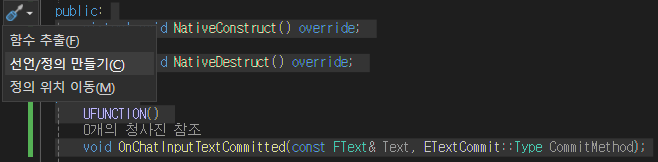
추가한 부분을 지정하여 Ctrl + . 버튼을 누르고, 선언/정의 만들기
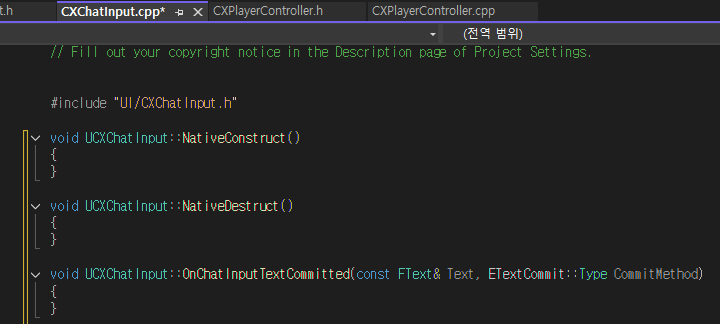
cpp파일에 정의가 추가된 것을 확인할 수가 있다. 아주 좋은 기능이다.
// CXChatInput.cpp

#include "UI/CXChatInput.h"
#include "Components/EditableTextBox.h"
#include "Player/CXPlayerController.h"

void UCXChatInput::NativeConstruct()
{
	Super::NativeConstruct();

	if (EditableTextBox_ChatInput->OnTextCommitted.IsAlreadyBound(this, &ThisClass::OnChatInputTextCommitted) == false) // Construct에 만약 바인드가 되지 않았다면 바인드 되게끔
	{
		EditableTextBox_ChatInput->OnTextCommitted.AddDynamic(this, &ThisClass::OnChatInputTextCommitted);
	}
}

void UCXChatInput::NativeDestruct()
{
	Super::NativeDestruct();

	if (EditableTextBox_ChatInput->OnTextCommitted.IsAlreadyBound(this, &ThisClass::OnChatInputTextCommitted) == true) // 연결이 되어있다면 연결을 끊게끔
	{
		EditableTextBox_ChatInput->OnTextCommitted.RemoveDynamic(this, &ThisClass::OnChatInputTextCommitted);
	}
}

void UCXChatInput::OnChatInputTextCommitted(const FText& Text, ETextCommit::Type CommitMethod)
{
	if (CommitMethod == ETextCommit::OnEnter)
	{
		APlayerController* OwningPlayerController = GetOwningPlayer(); // 엔터를 친 컴퓨터에 PlayerController가 나오게 됌
		if (IsValid(OwningPlayerController) == true)
		{
			ACXPlayerController* OwningCXPlayerController = Cast<ACXPlayerController>(OwningPlayerController);
			if (IsValid(OwningCXPlayerController) == true)
			{
				OwningCXPlayerController->SetChatMessageString(Text.ToString()); // ChatMessageString에 들어온 채팅메시지를 이 컨트롤러가 관리하는 채팅메시지 정보로 업데이트

				EditableTextBox_ChatInput->SetText(FText()); // 비어있는 채팅창으로 만듬
			}
		}
	}
}
추가할게 많다.
( 여기서 1>CXChatInput.gen.cpp.obj : error LNK2019: "__declspec(dllimport) class UEnum * __cdecl Z_Construct_UEnum_SlateCore_ETextCommit(void)" (__imp_?Z_Construct_UEnum_SlateCore_ETextCommit@@YAPEAVUEnum@@XZ)"void __cdecl `dynamic initializer for 'public: static struct UECodeGen_Private::FBytePropertyParams const Z_Construct_UFunction_UCXChatInput_OnChatInputTextCommitted_Statics::NewProp_CommitMethod''(void)" (??__E?NewProp_CommitMethod@Z_Construct_UFunction_UCXChatInput_OnChatInputTextCommitted_Statics@@2UFBytePropertyParams@UECodeGen_Private@@B@@YAXXZ) 함수에서 참조되는 확인할 수 없는 외부 기호 )
이런 에러가 떴다면 프로젝트 폴더 내의 [프로젝트이름].Build.cs 파일을 열고, PublicDependencyModuleNames 또는 PrivateDependencyModuleNames 목록에 **"SlateCore"**를 추가해야 함.
이 에러는 **ETextCommit**이라는 Slate 관련 열거형(Enum)을 사용하고 있지만, 해당 정의가 포함된 모듈을 프로젝트의 빌드 설정에 추가하지 않아서 발생하는 링커(Linker) 에러다.
에러가 뜨지않거나 해결했다면 다음 단계 실행
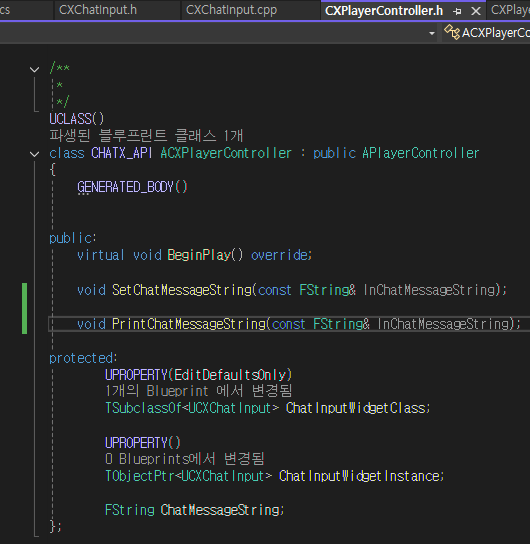
플레이어컨트롤러 헤더파일에 PrintChatMessageString이라는 함수를 추가해주고,
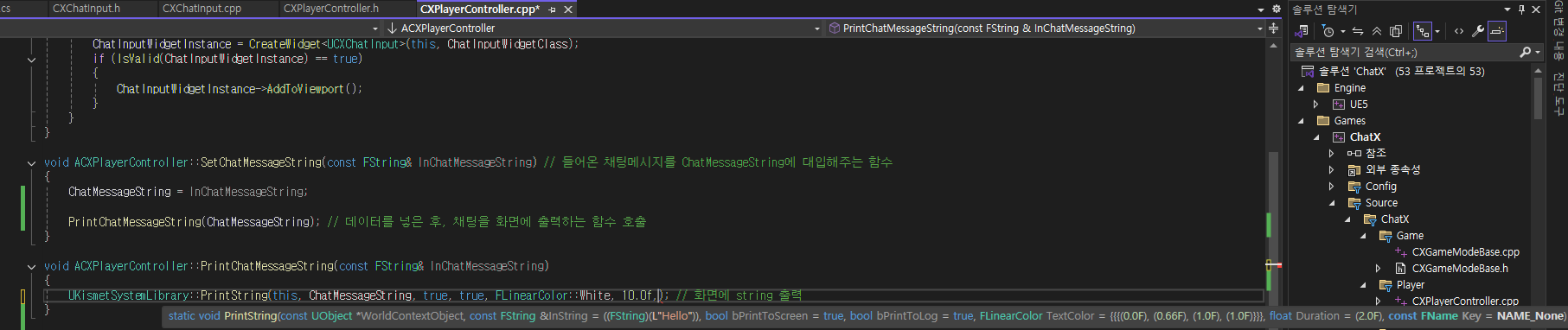
정의해줌.

(매개변수 설명)
실행하고 테스트.
'Unreal 개강 TIL' 카테고리의 다른 글
| 서버의 종류와 데디케이티드 서버 (0) | 2026.03.13 |
|---|---|
| Unreal 믹사모 애니메이션 리타게팅 하기 (0) | 2026.03.13 |
| CH3 Unreal ) EXODUS 회고록 (0) | 2026.03.05 |
| Unreal C++ 텍스처를 활용해 타격 시 피/살점이 튀는 파티클 만들기 (0) | 2026.02.24 |
| Unreal C++ 캐릭터 스켈레톤에 무기추가 (0) | 2026.02.23 |